What it does
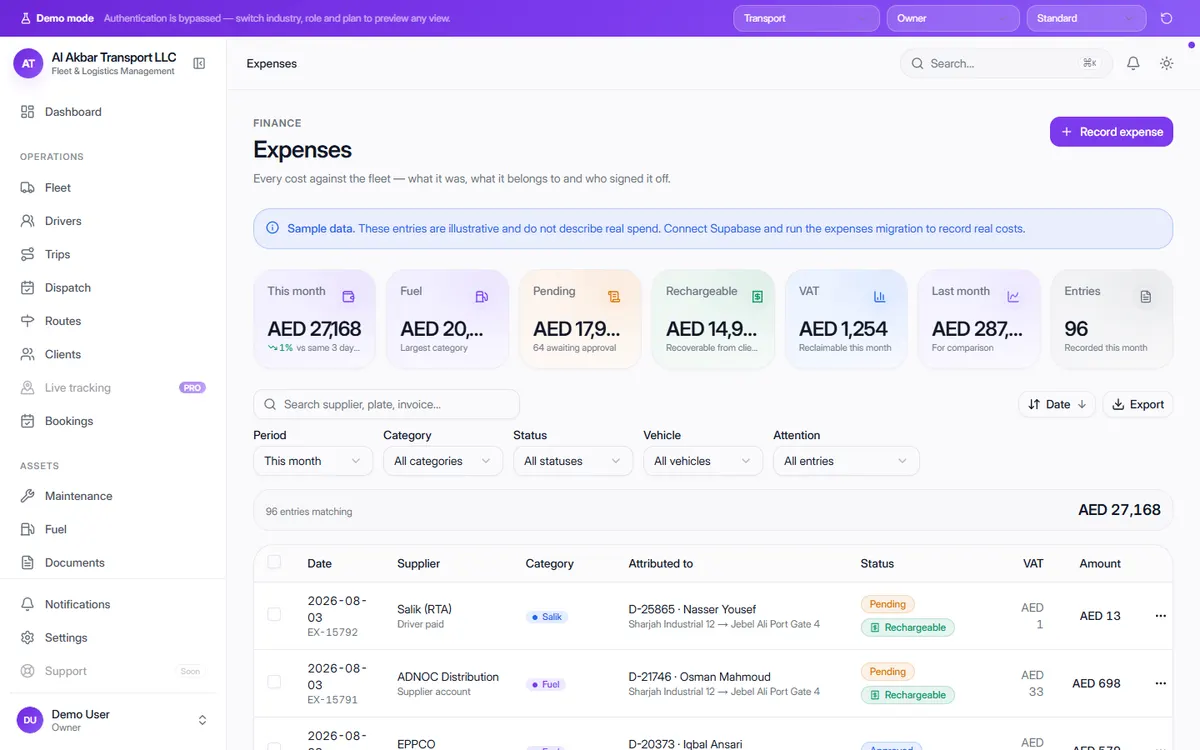
Small costs — tolls, parking, repairs, fuel paid in cash — add up quickly and are easy to lose. OneFlow records each expense with its supplier, category, what it is attributed to, approval status, VAT and amount.
Expenses waiting for approval are totalled so nothing is paid without sign-off, and rechargeable costs that you can bill back to clients are tracked separately so they end up on the invoice.
In the demo, the screen describes itself as: Every cost against the fleet — what it was, what it belongs to and who signed it off.
What the screen shows
- Total spend this month, compared with last month
- Largest category
- Pending — awaiting approval
- Rechargeable — recoverable from clients
- VAT reclaimable this month
- Per expense: date, supplier, how it was paid, category (e.g. fuel, Salik tolls), attributed vehicle, driver and route, status, VAT and amount
Why it helps
Cost per vehicle, not just per month
Each expense is attributed to a vehicle, driver or route, so you can see what each part of the business really costs.
Nothing is paid without approval
Pending expenses are totalled until someone approves them.
Bill back what clients owe you
Rechargeable costs are tracked separately, so tolls and waiting charges make it onto the client's invoice.
See it in the live demo
Open the free live demo, choose “Transport” on the first screen and click Expenses in the sidebar. No sign-up is needed — everything you see is sample data.
Transport management software — all modules
Frequently asked questions
What is a rechargeable expense?
A cost you pay on a client's behalf and can bill back to them — for example a toll on their route. OneFlow marks these so they can be added to the client's invoice.
Can expenses be linked to a vehicle?
Yes. Each expense can be attributed to a vehicle, its driver and the route, which feeds per-vehicle reports.
Where is it in the demo?
Open the live demo, choose “Transport” and click Expenses under Finance.