What it does
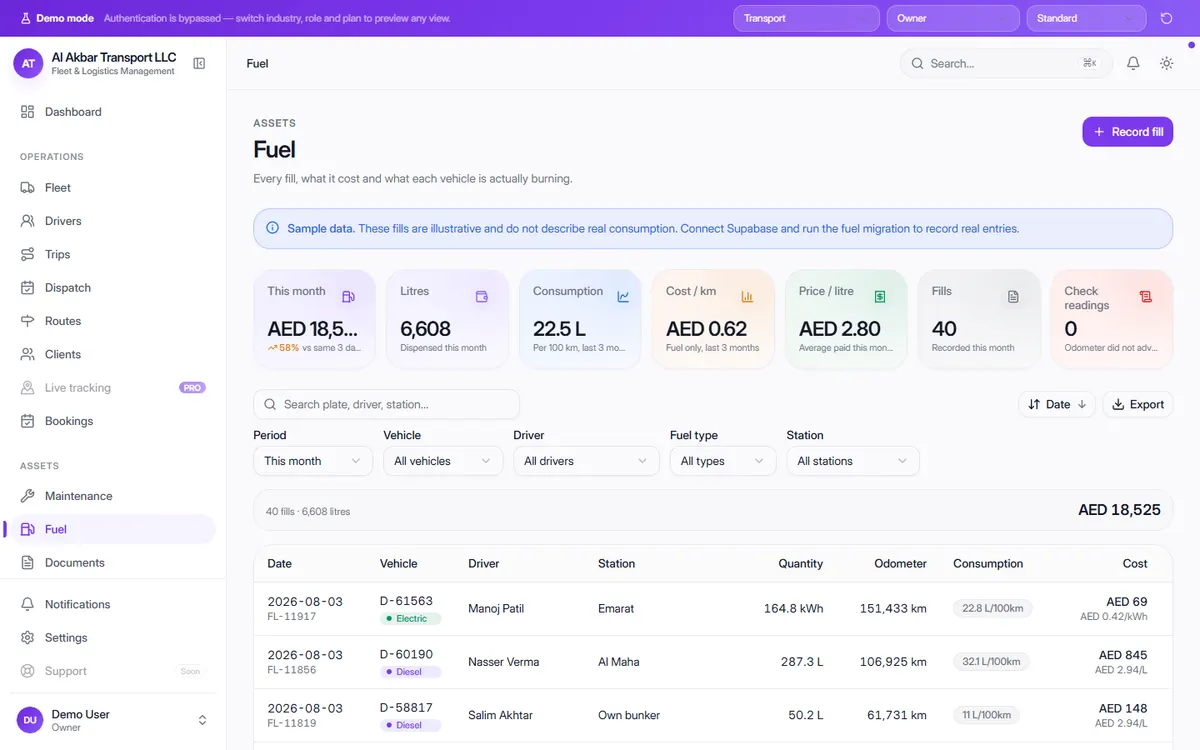
Fuel is usually the biggest running cost in a transport business, and the hardest to check. OneFlow records every fill with the vehicle, driver, station, quantity and odometer reading, then works out consumption for each vehicle.
The screen totals fuel spend and litres for the month, average consumption, cost per kilometre and average price per litre — and flags readings where the odometer did not move between fills.
In the demo, the screen describes itself as: Every fill, what it cost and what each vehicle is actually burning.
What the screen shows
- Fuel spend this month, compared with last month
- Litres dispensed this month
- Consumption — litres per 100 km
- Cost per km — fuel only
- Average price paid per litre
- Number of fills recorded
- Check readings — fills where the odometer did not advance
- Per fill: vehicle, fuel type (diesel, petrol or electric), driver, station, quantity, odometer, consumption and cost
Why it helps
Spot vehicles burning too much
Consumption per vehicle shows which trucks need a check-up — or a closer look at how they are being filled.
Catch suspicious entries
Fills where the odometer reading didn't advance are counted separately so they can be checked.
Know your real cost per kilometre
Fuel cost per km helps you price trips properly instead of guessing.
See it in the live demo
Open the free live demo, choose “Transport” on the first screen and click Fuel in the sidebar. No sign-up is needed — everything you see is sample data.
Transport management software — all modules
Frequently asked questions
How does OneFlow calculate fuel consumption?
From the litres filled and the distance between odometer readings, shown as litres per 100 km for each fill and as an average for the fleet.
Does it handle electric vehicles?
Yes. The demo records diesel, petrol and electric fills — electric charging is logged in kWh with its price per kWh.
Where is it in the demo?
Open the live demo, choose “Transport” and click Fuel under Assets.