What it does
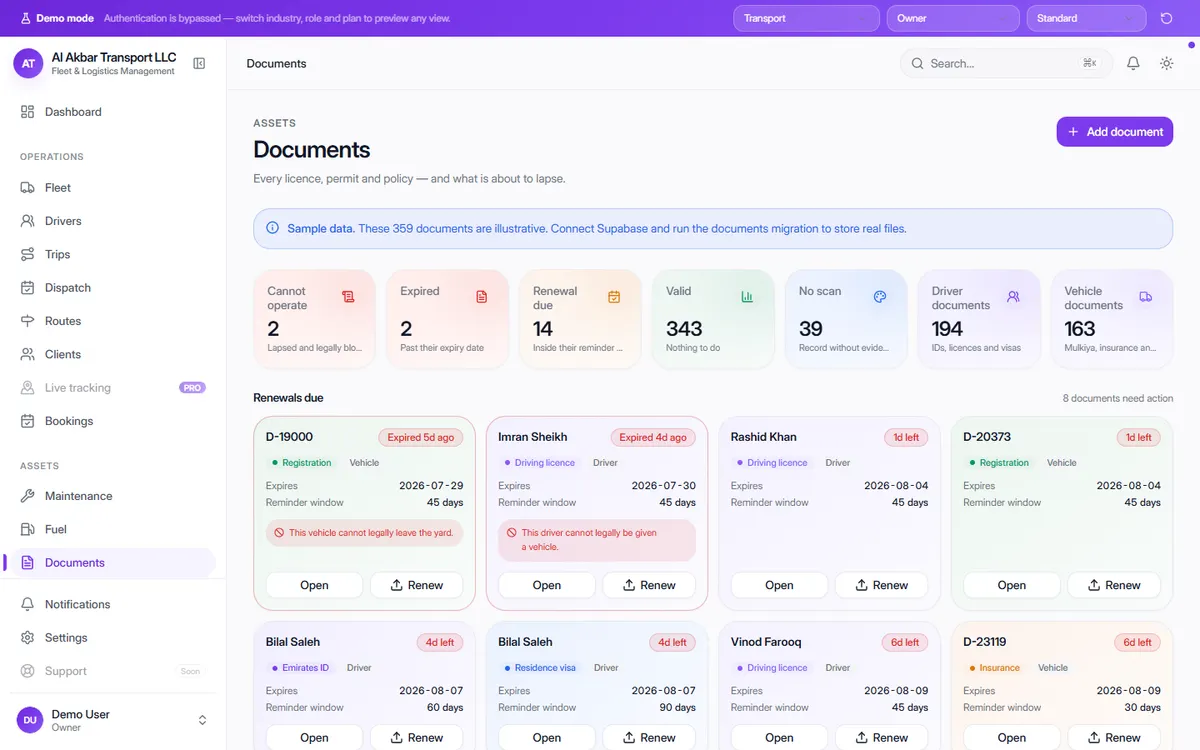
An expired registration or driving licence can mean a fine, an impounded vehicle or a driver who can't legally work. OneFlow keeps every driver and vehicle document with its expiry date and a reminder window, and tells you what needs renewing.
Documents that have lapsed and legally block a vehicle or driver are shown first — for example, “This vehicle cannot legally leave the yard.” — followed by expired documents, renewals due, and records that have no scanned copy.
In the demo, the screen describes itself as: Every licence, permit and policy — and what is about to lapse.
What the screen shows
- Cannot operate — lapsed and legally blocking
- Expired — past the expiry date
- Renewal due — inside the reminder window
- Valid — nothing to do
- No scan — record without a scanned copy
- Driver documents — IDs, licences and visas
- Vehicle documents — registration (Mulkiya), insurance and permits
- Renewal cards with expiry date and reminder window
Why it helps
Renew before it becomes a fine
Each document has a reminder window, so renewals show up weeks before the expiry date.
Know who can't legally work today
Lapsed documents that block a vehicle or driver are listed first, so they are never sent out by mistake.
Evidence for every record
Records without a scanned copy are counted, so the vault doesn't fill up with dates nobody can prove.
See it in the live demo
Open the free live demo, choose “Transport” on the first screen and click Documents in the sidebar. No sign-up is needed — everything you see is sample data.
Transport management software — all modules
Frequently asked questions
Which documents can I track?
Driver documents such as IDs, driving licences and visas, and vehicle documents such as registration (Mulkiya in the UAE), insurance and permits — each with an expiry date and reminder window.
Is document tracking only for transport companies?
No. The Documents module is part of every OneFlow industry, so salons, clinics, schools and other businesses use it for their own licences and staff papers.
Where is it in the demo?
Open the live demo, choose “Transport” and click Documents under Assets.