What it does
A missed oil change or brake service costs far more than the service itself. OneFlow's maintenance module keeps the full service history for each vehicle and works out what is due next, both by date and by odometer reading.
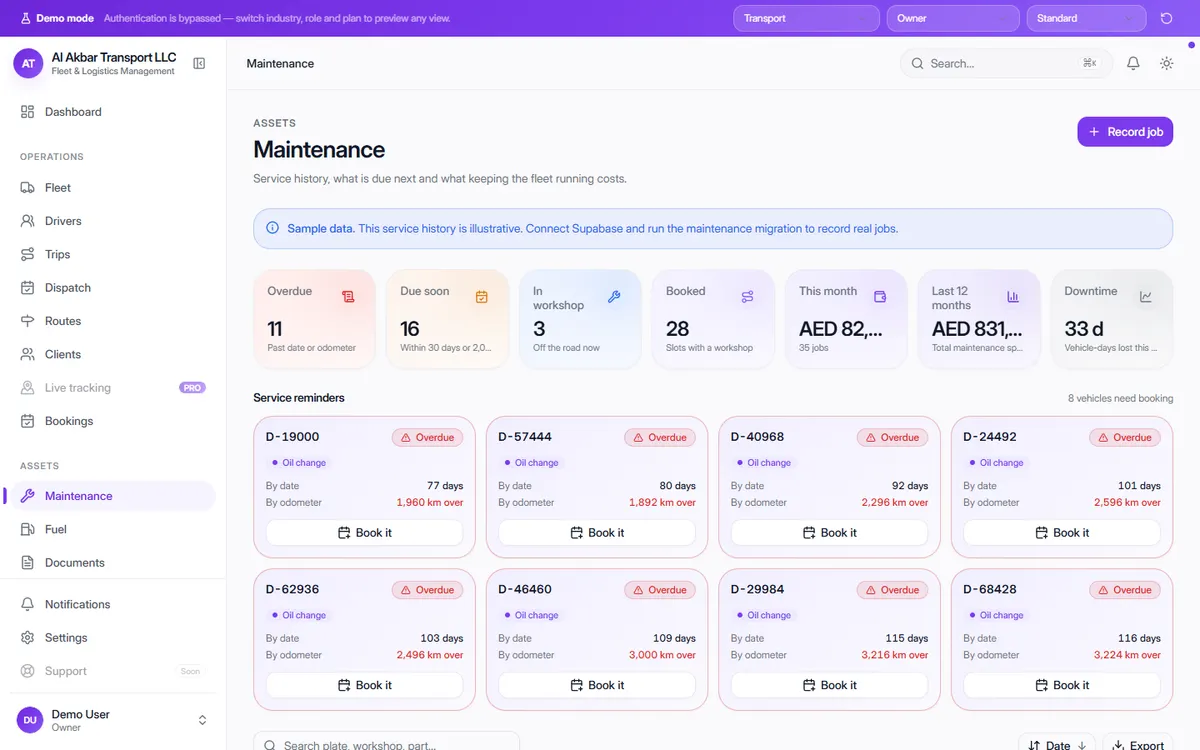
Service reminder cards show exactly how far past due each vehicle is, with a button to book it. Monthly and yearly maintenance spend and vehicle-days lost to downtime sit at the top of the screen.
In the demo, the screen describes itself as: Service history, what is due next and what keeping the fleet running costs.
What the screen shows
- Overdue — past the date or the odometer reading
- Due soon — within 30 days or 2,000 km
- In workshop — off the road now
- Booked — slots with a workshop
- Maintenance spend this month and over the last 12 months
- Downtime — vehicle-days lost this month
- Per job: date, vehicle, work done, workshop, status, odometer, next due and cost
Why it helps
Reminders by date and by kilometre
A vehicle that drives a lot is flagged by distance even if its service date hasn't arrived yet.
See what maintenance really costs
Spend per month and per year, plus downtime, shows which vehicles are becoming too expensive to keep.
Full service history per vehicle
Every job records the workshop, odometer and cost, so you have a history when you sell or replace a vehicle.
See it in the live demo
Open the free live demo, choose “Transport” on the first screen and click Maintenance in the sidebar. No sign-up is needed — everything you see is sample data.
Transport management software — all modules
Frequently asked questions
How are service reminders calculated?
Each service cycle has a date and an odometer interval. A vehicle is overdue when either is passed and due soon when it is within 30 days or 2,000 km.
Does it track maintenance cost?
Yes. Each job records its cost, and the screen totals spend for the month and the last 12 months along with vehicle downtime.
Where do I see it in the demo?
Open the live demo, choose “Transport” and click Maintenance under Assets.