What it does
OneFlow's trips module lists every job with its client, route, time window, driver and vehicle, status, distance and fare. The same trips can be viewed as a list, a calendar, a daily schedule or a dispatch board.
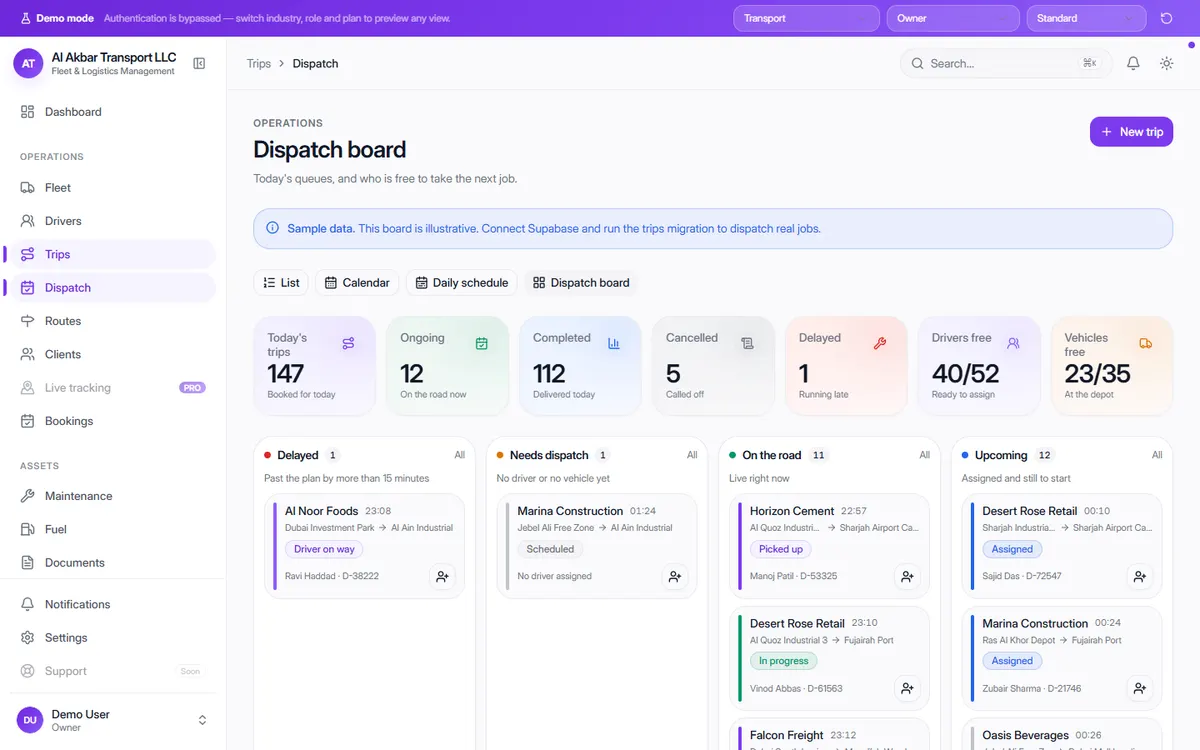
The dispatch board splits today's work into queues: trips running more than 15 minutes past plan, trips that still have no driver or vehicle, and trips live on the road right now — next to how many drivers and vehicles are free.
In the demo, the screen describes itself as: Today's queues, and who is free to take the next job.
What the screen shows
- Today's trips, ongoing, completed, cancelled and delayed
- Delayed — past the plan by more than 15 minutes
- Needs dispatch — no driver or no vehicle yet
- On the road — live trip statuses (driver on way, picked up, in progress)
- Drivers free and vehicles free right now
- Per trip: client, pickup → drop-off, job type, time window, driver & vehicle, distance and fare
- List, calendar, daily schedule and dispatch board views
Why it helps
No job falls through the cracks
Trips without a driver or vehicle sit in their own queue until someone is assigned.
Spot delays while you can still act
Trips running late are separated from the rest, so you can call the client before they call you.
Fare and distance on every trip
Each trip carries its distance and fare, which feeds straight into invoicing and reports.
See it in the live demo
Open the free live demo, choose “Transport” on the first screen and click Trips in the sidebar. No sign-up is needed — everything you see is sample data.
Transport management software — all modules
Frequently asked questions
What job types does the demo use?
Deliveries, collections, shuttles, transfers and long-haul trips — each trip records its route, planned time window, distance and fare.
How is a trip marked as delayed?
On the dispatch board, a trip running more than 15 minutes past its plan moves into the Delayed queue.
Can I see the dispatch board in the demo?
Yes. Open the live demo, choose “Transport” and click Dispatch in the sidebar.