What it does
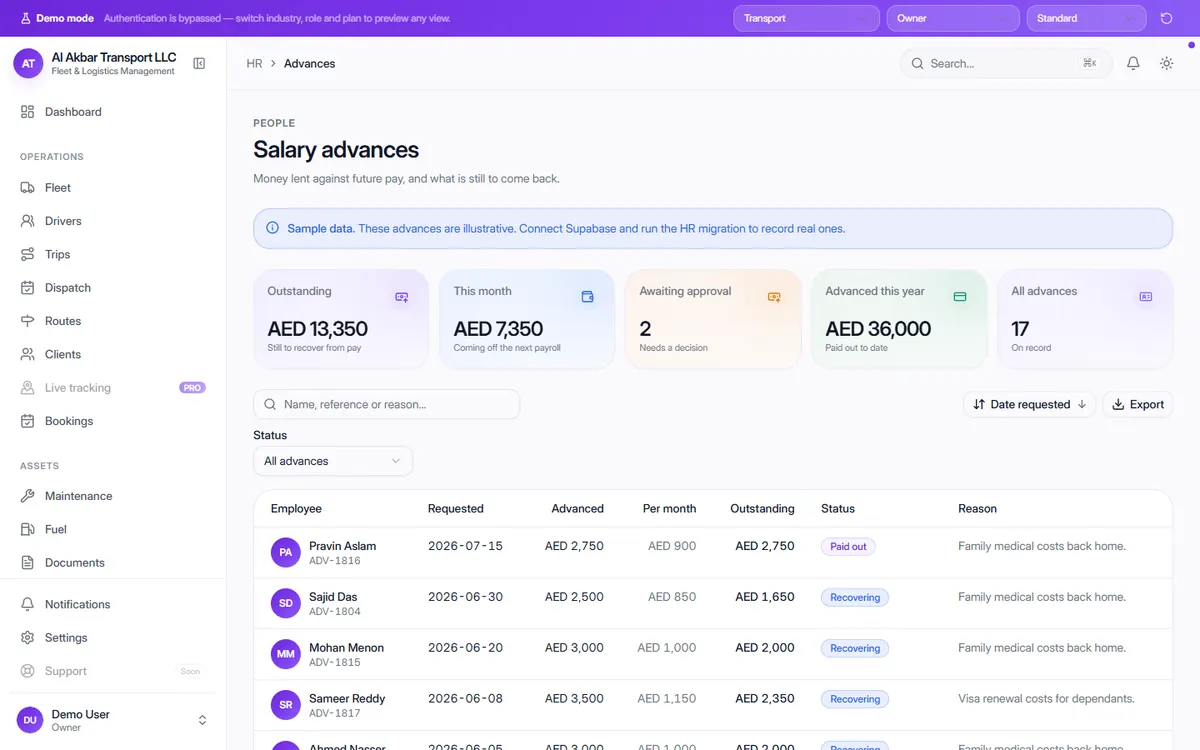
Advances to drivers and staff are common, and they are easy to lose track of when they live in a notebook. OneFlow records each advance with the amount, the monthly deduction, what is still outstanding, its status and the reason.
The totals show how much is still to be recovered, how much will come off the next payroll and which requests are waiting for a decision. HR, attendance and leave modules sit alongside it in every OneFlow industry.
In the demo, the screen describes itself as: Money lent against future pay, and what is still to come back.
What the screen shows
- Outstanding — still to recover from pay
- This month — coming off the next payroll
- Awaiting approval
- Advanced this year
- Per advance: employee, date requested, amount, monthly deduction, outstanding balance, status (paid out or recovering) and reason
- Related modules: HR, attendance and leave
Why it helps
Every rupee or dirham accounted for
Each advance shows what is left to recover, so nothing is forgotten when someone leaves.
Deductions planned in advance
The monthly deduction is set when the advance is given, and the total due off the next payroll is shown up front.
Approvals in one place
Advance requests waiting for a decision are counted, so they don't sit unanswered on WhatsApp.
See it in the live demo
Open the free live demo, choose “Transport” on the first screen and click Advances in the sidebar. No sign-up is needed — everything you see is sample data.
Transport management software — all modules
Frequently asked questions
Does OneFlow deduct advances from salary?
Each advance has a per-month recovery amount, and the screen shows the total coming off the next payroll and what is still outstanding.
Is this only for drivers?
No. HR, attendance, leave and advances are included for every OneFlow industry, for any member of staff.
Where is it in the demo?
Open the live demo, choose any business and click Advances under People.