What it does
Most transport companies track their vehicles across a register, a spreadsheet and a WhatsApp group. OneFlow puts the whole fleet on one screen, so you can see at a glance which trucks are earning, which are waiting at the depot and which are stuck in the workshop.
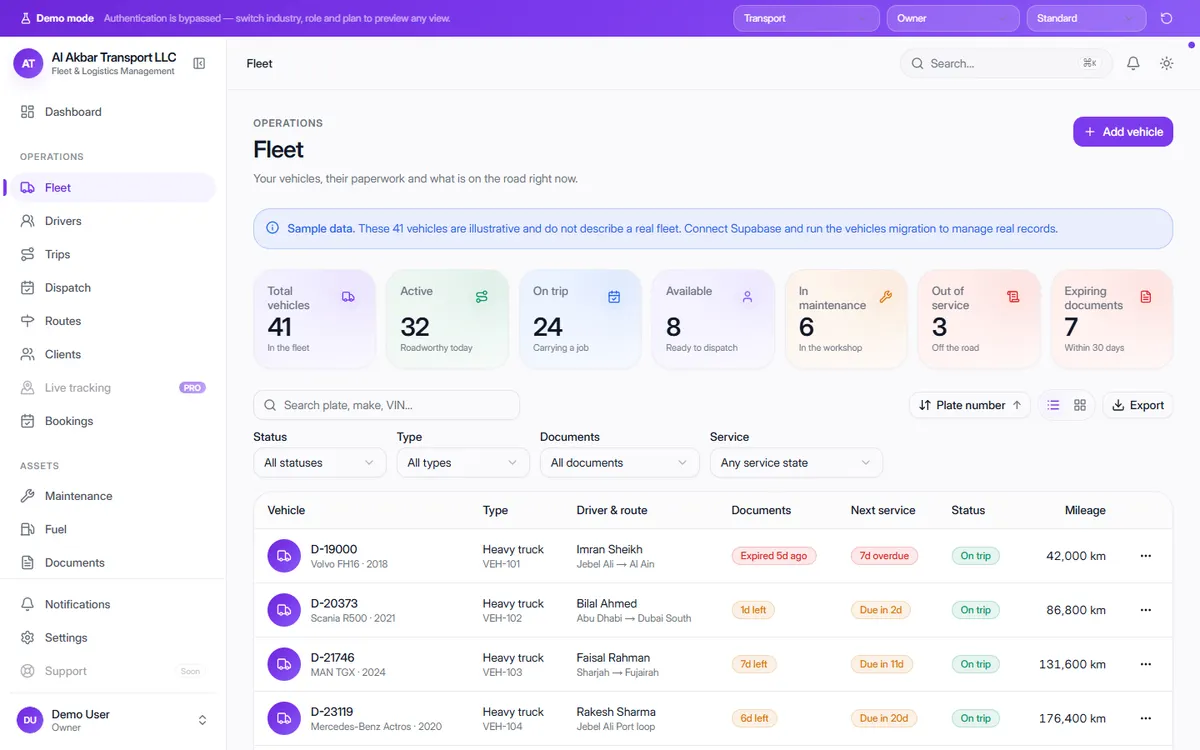
Each vehicle carries its type, assigned driver and route, the state of its documents, the next service and its mileage — and you can switch between a table and card view, filter and export.
In the demo, the screen describes itself as: Your vehicles, their paperwork and what is on the road right now.
What the screen shows
- Total vehicles in the fleet
- Active — roadworthy today
- On trip — carrying a job
- Available — ready to dispatch
- In maintenance — in the workshop
- Out of service — off the road
- Documents expiring within 30 days
- Per vehicle: type, driver & route, documents, next service, status and mileage
Why it helps
Know what is free before you promise a job
Available and on-trip counts tell your dispatcher instantly whether a new booking can be covered today.
Stop running vehicles with expired papers
Expired and expiring documents are flagged on the vehicle itself, so nobody sends out a truck that can't legally drive.
See downtime clearly
Vehicles in the workshop or out of service are counted separately, so you can see how much of the fleet is actually earning.
See it in the live demo
Open the free live demo, choose “Transport” on the first screen and click Fleet in the sidebar. No sign-up is needed — everything you see is sample data.
Transport management software — all modules
Frequently asked questions
What does OneFlow's fleet module track?
Each vehicle's plate, make and model, type, assigned driver and route, document status, next service, status and mileage — plus totals for active, on-trip, available, in-maintenance and out-of-service vehicles.
Can I see it working before buying?
Yes. Open the free live demo, choose “Transport” and click Fleet in the sidebar. It uses sample data, so you can explore without signing up.
Does it work for trucks, vans and light vehicles?
Yes. The demo fleet mixes heavy trucks and light trucks, and each vehicle has its own type, so you can run a mixed fleet from the same list.
Can I use it in Pakistan as well as the UAE?
Yes. OneFlow is web-based and runs in any browser on a computer, tablet or phone. The demo is set up for a UAE company; a purchased deployment is configured for your business.