What it does
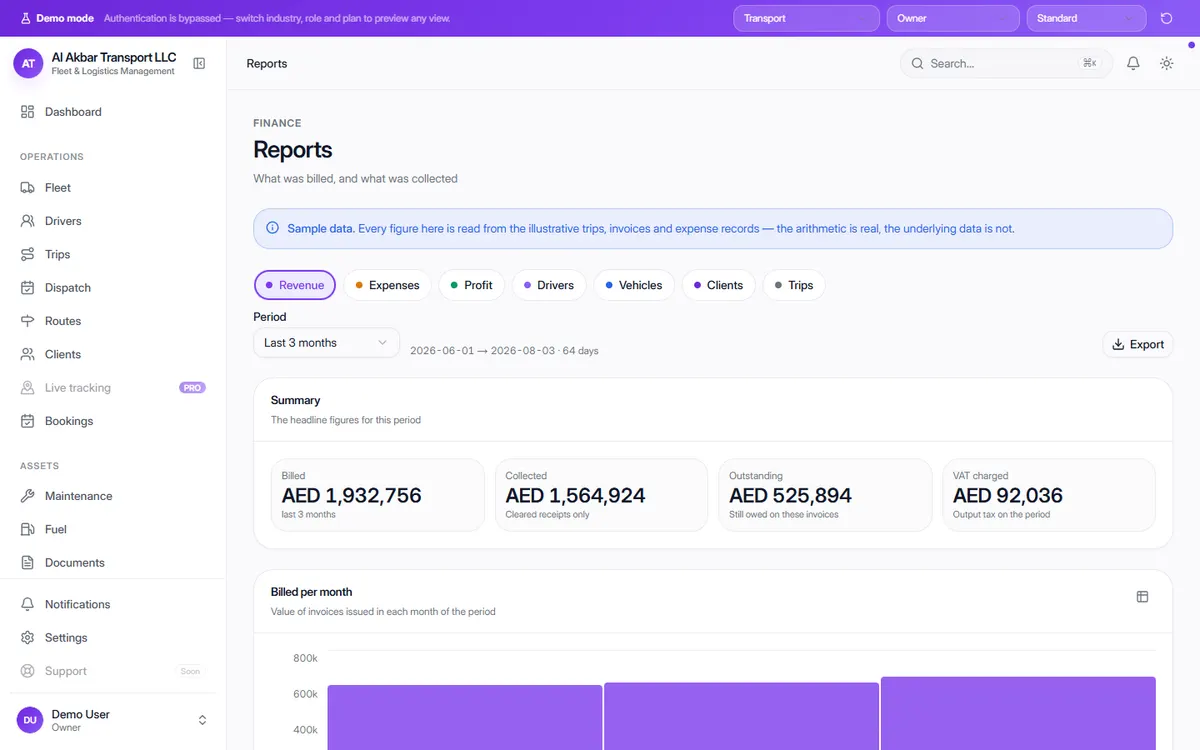
OneFlow's reports are calculated from the trips, invoices and expenses already in the system, so there's no separate spreadsheet to keep up to date. Pick a period and see what was billed, what was collected, what is still owed and the VAT charged.
Tabs break the business down further — revenue, expenses, profit, drivers, vehicles, clients and trips — and each report can be exported.
In the demo, the screen describes itself as: What was billed, and what was collected.
What the screen shows
- Billed, collected (cleared receipts only) and outstanding for the period
- VAT charged in the period
- Billed per month chart
- What was charged for — billed value by line type (e.g. haulage, recharged cost, waiting time)
- Collection — how much of what was billed has arrived
- Report tabs: revenue, expenses, profit, drivers, vehicles, clients and trips
- Export
Why it helps
Billed isn't the same as collected
Reports separate money invoiced from money actually received, so cash flow problems show up early.
Profit by vehicle, driver and client
Breakdowns show which trucks, drivers and customers make you money — and which don't.
No double entry
Figures come from the trips, invoices and expenses you already record.
See it in the live demo
Open the free live demo, choose “Transport” on the first screen and click Reports in the sidebar. No sign-up is needed — everything you see is sample data.
Transport management software — all modules
Frequently asked questions
Where do the report figures come from?
From the trips, invoices and expenses recorded in OneFlow. In the demo the arithmetic is real but the underlying data is sample data.
Can I see reports by vehicle or driver?
Yes. Reports have tabs for revenue, expenses, profit, drivers, vehicles, clients and trips, for any period you choose.
Where is it in the demo?
Open the live demo, choose “Transport” and click Reports under Finance.